
CARROT Weather
Grailr LLCWeather
2.41.02K Reviews
- Version
- 2.5.2
- Installs
- 500.00K
- Age Rating
- Everyone
Screenshots
Our Review of CARROT Weather
 Analysis by Appyee
I usually check the weather while getting ready, not because I want a long forecast, but because I need to know whether my plans will work. CARROT Weather makes that routine more entertaining with a mischievous voice, while still centering the experience on weather information. Its jokes are a welcome change from the plain presentation of many forecast apps, though I would choose it for personality as much as for practical use.
Where the experience can trip you up
The first thing to keep in mind is that a witty forecast and a dependable decision-making tool are not the same thing. A funny line can make the app memorable, but it should not be the only part you read when deciding whether to leave early, carry rain gear, or change an outdoor plan. I treat the humor as decoration around the forecast, not as a substitute for checking the details that matter to me.
There is also a learning curve to the app’s playful approach. If you prefer a screen that immediately presents only the essentials, commentary and extra options may feel like clutter rather than charm. I’d spend a little time finding the information I check most often, then make that the focus of my routine. That way the personality stays enjoyable without slowing down a quick morning glance.
People sometimes get stuck because they expect the app to behave exactly like a stripped-down utility. CARROT Weather is more expressive than that, and its customization and engagement elements can invite exploration. My practical advice is to start with the basic forecast and alerts you care about. You can investigate the lighter extras later, once you know whether its core presentation suits you.
Setup checks that make daily use easier
When setting up any weather app, I first make sure the location shown is the place I actually need. That matters if I am checking conditions for a commute, a visit across town, or a trip rather than simply looking at the weather where I am standing. If the forecast seems irrelevant, I check the selected location before assuming the information itself is wrong.
I also take a moment to review the app’s available settings and decide which details I want to see regularly. CARROT Weather is built to be customized, so there is a trade-off: the flexibility is useful, but an untouched screen may not match everyone’s idea of a quick forecast. I would avoid changing several things at once. Adjust one part, use it for a day, and then decide whether another change would genuinely help.
Alerts are worth checking deliberately rather than assuming they will match your habits automatically. Think about whether you want notifications for severe conditions and whether your device’s notification settings allow the ones you choose to appear. If an alert does not arrive, checking both the app’s options and the phone’s notification controls is a sensible first step; it is more useful than repeatedly reopening the forecast and hoping the behavior changes.
Recovering a useful forecast routine
For a realistic weekday, I might check the day’s forecast while making coffee, then look again before leaving if rain could affect my walk. The minute-by-minute view is particularly relevant to that second check: it can help me judge whether I should wait a little, take an umbrella, or simply accept getting wet. I would still leave room for conditions to change, especially when the weather matters to a longer trip.
If something looks off, I use a simple sequence: confirm the location, refresh my understanding by checking the current forecast again, and compare the timing with what is happening outside. A mismatch does not automatically mean the app is broken; forecasts are estimates, and conditions can shift. For an important outdoor event, I would check again closer to departure instead of treating one earlier glance as a guarantee.
The weekly view serves a different purpose from minute-by-minute predictions. I use the broader forecast to sketch out plans, not to make a promise to myself that a particular day will unfold exactly as shown. For a picnic or a long drive, I’d use the early outlook to choose a possible time and then revisit the details as the day approaches. This distinction helps prevent a common frustration: expecting a far-ahead forecast to have the same usefulness as an immediate rain check.
The app’s Time Machine is more of a curiosity than a planning tool I would rely on for today’s decisions. Looking at past or future weather can be entertaining, and it gives weather-minded users something to explore beyond the current conditions. I would keep that separate from checking what to wear now. The feature is fun precisely because it invites browsing, but it should not distract from the practical forecast when I am in a hurry.
When the app may not be the cause
Weather results depend on more than an app’s interface. If the location is wrong, the phone is using an unexpected setting, or a connection is temporarily unavailable, the screen may not reflect what you need at that moment. Before blaming the forecast, I would check that the chosen place is correct and that the device can access current information. Those basic checks often clarify whether the issue is the app or the circumstances around it.
Even with a correct location, a forecast can differ from what you experience. Weather changes, and a forecast is not a guarantee that rain will start or stop at a precise moment. For decisions with real consequences, such as planning a long outdoor outing, I use the app as one input and check again nearer the time. That is not a special flaw of CARROT Weather; it is a sensible way to use forecasts generally.
The app is not my first recommendation for someone who wants the quietest possible interface or who dislikes jokes mixed into everyday information. A standard weather utility may be a better fit if all you want is a glanceable temperature and minimal interaction. Similarly, if you need to make a high-stakes decision based on weather, I would not let a single app or a playful presentation be the only source guiding that choice.
The Unique Charm of CARROT Weather
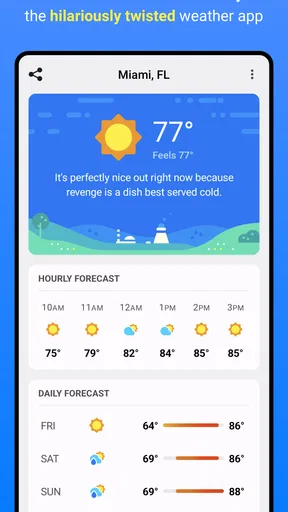
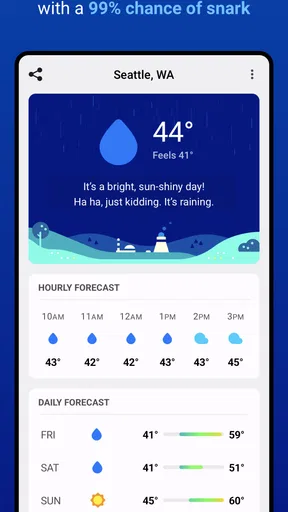
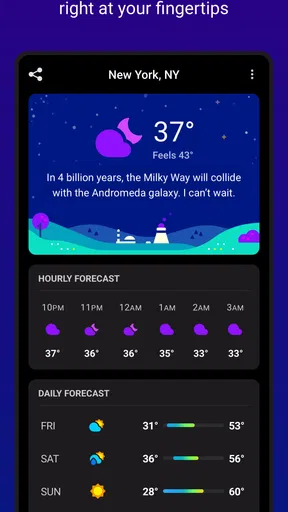
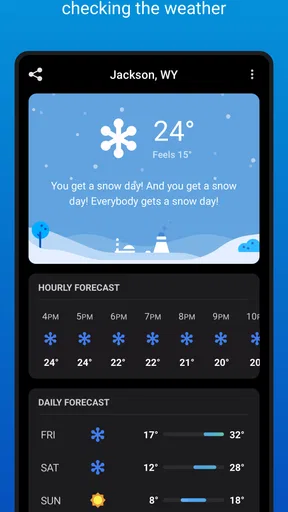
First things first, let's talk about what sets CARROT Weather apart. This app doesn't just give you the weather — it gives you attitude. It’s like having a sassy meteorologist in your pocket. The interface is clean, but the comments are anything but. They range from cheeky to downright sarcastic, and quite frankly, they make checking the weather entertaining.
Features Worth Checking Out
Beyond its quirky personality, CARROT Weather packs a punch with its features. It's powered by Dark Sky’s hyper-local forecasts, so you know you’re getting precise information. Plus, it offers minute-by-minute predictions that are perfect for those "do I need an umbrella?" moments.
- Forecasts: Detailed daily and weekly forecasts with animations that are as informative as they are amusing.
- Alerts: Get notified about severe weather conditions, so you’re never caught off guard.
- Customization: Tailor the app with tons of settings. Whether you want simple data or detailed analytics, it's all at your fingertips.
One of my favorite features is the Time Machine. With a tap, I can explore past and future weather conditions. It's a geeky thrill to check the weather on my birthday from years ago or see what’s predicted for a future trip.
Interactivity and Engagement
The app doesn’t just provide data — it engages you. The more you use it, the more features you unlock. It’s like a game within an app, and who doesn’t love a little extra incentive to check the weather?
Plus, there are fun achievements to earn, which adds a layer of gamification. From collecting secret locations to discovering hidden Easter eggs, CARROT Weather keeps things fresh and exciting.
User Experience and Interface
The user interface is where CARROT Weather shines. It's intuitive, with a sleek design that makes navigating a breeze. The animations are smooth, and the app runs without a hitch. I appreciate that it doesn’t bombard you with ads, just the occasional cheeky remark.
"It's like having a comedian deliver your weather forecast."
That pretty much sums up the experience. It’s engaging, informative, and never dull.
Who will enjoy it—and who should pass
I can see this appealing most to people who already check the forecast every day and want that small routine to feel less mechanical. The snark gives ordinary weather checks a distinct voice, while customization offers room to make the information more personally useful. If you enjoy exploring app settings, checking forecast details, and occasionally wandering into an Easter egg, there is more here to hold your attention than a plain temperature display.
On the other hand, I would steer a no-nonsense user toward a simpler alternative if the humor gets in the way. Someone who only wants a fast answer before stepping outside may prefer a basic built-in weather app. A traveler comparing conditions across several places may also want to prioritize whichever weather tool makes those locations easiest for them to follow. CARROT Weather’s appeal is its particular mix of forecasts and attitude, not a promise that it is the ideal format for every habit.
Price, fit, and what to expect
CARROT Weather is a free weather app from Grailr LLC, with in-app purchases listed from $1.99 to $19.99 per item. I would begin with the free experience and decide whether the app’s style and day-to-day usefulness justify exploring any optional purchases. That is a more sensible approach than paying simply because the app has extra settings or playful elements; the right choice depends on what you actually use.
It is rated for Everyone, and the current version is 2.5.2, with a minimum OS requirement of 8.0. The app was released on Jul 10, 2018, and has passed 500K installs. Its average rating is 2.5 from 3K ratings, alongside 1K reviews. I would treat that rating as a reason to consider fit carefully rather than as a verdict by itself: weather habits, expectations about humor, and preferences for customization can make the experience feel quite different from person to person.
Compared with the usual weather app, CARROT Weather makes a more deliberate choice to entertain while presenting forecasts. That can make frequent checks feel less dull, but the trade-off is that someone seeking a completely neutral, bare-bones display may find the voice distracting. I would judge it by trying the everyday forecast flow, not by the novelty of a joke or an exploratory feature alone.
The Verdict
So, is CARROT Weather worth downloading? Absolutely. If you’re looking for a weather app that’s as functional as it is entertaining, this is the one for you. It turns a mundane task into a delightful daily ritual.
Whether you’re a weather enthusiast or just someone who likes a bit of humor with their forecast, CARROT Weather delivers. Trust me, once you try it, you’ll wonder how you ever checked the weather without a little sass.
Ready to spice up your weather updates? You can download CARROT Weather from your app store and start enjoying forecasts with a side of sarcasm.
Verdict
Strengths of CARROT Weather
- Detailed and accurate weather forecasts.
- Customizable widgets for quick access.
- Humorous commentary adds fun to forecasts.
- Integration with smart home devices.
- Supports multiple weather data sources.
Limitations of CARROT Weather
- Premium features require a subscription.
- UI can be overwhelming for new users.
- Notifications can be too frequent.
- Limited offline functionality.
- Lacks a free trial option.
Similar Picks in This Category
View All
Weather - By Xiaomi
Xiaomi Inc.4.1

Weather & Radar Forecast
WetterOnline4.8

Weather
OneLouder Apps4.6

AccuWeather: Weather Radar
AccuWeather3.6

The Weather Channel - Radar
The Weather Channel4.6

1Weather Forecasts & Radar
OneLouder Apps4.3
Frequently Asked Questions
What makes CARROT Weather different from other weather apps?
CARROT Weather stands out due to its unique, personality-driven approach. It combines accurate weather forecasting with humor and snarky commentary, providing an entertaining experience. The app offers detailed weather data, including hyper-local forecasts, and integrates with various weather sources for precise information. Its customizable interface allows users to tailor the experience to their preferences.
Does CARROT Weather offer accurate weather forecasts?
Yes, CARROT Weather is known for its accuracy. It aggregates data from multiple sources, including Dark Sky, AccuWeather, and other reputable meteorological services. This multi-source approach ensures users receive reliable and precise hyper-local forecasts, making it a trusted choice for those seeking detailed weather information.
Is CARROT Weather suitable for all ages?
While CARROT Weather is entertaining, its humor is often sarcastic and can include mature themes. Users should be aware that the app’s tone might not be suitable for young children. However, the app does offer a setting to adjust the level of snarkiness, allowing users to customize the experience to their comfort level.
What customization options are available in CARROT Weather?
CARROT Weather offers extensive customization options. Users can adjust the display to show specific data points like temperature, wind speed, and precipitation. The app also allows customization of the app’s personality, letting users choose the level of humor and snarkiness. Additionally, users can select different themes and widget styles to personalize their weather updates.
Does CARROT Weather require a subscription for full access?
CARROT Weather offers both free and premium tiers. The free version provides basic weather updates, but a subscription unlocks advanced features such as notifications, historical data, and additional weather sources. The premium version also includes customization options and enhanced app functionality, making it a worthwhile investment for weather enthusiasts.
